How to Turn AliExpress Product Videos into TikTok and Facebook Ads
Product videos sell. A ten-second clip of a jacket shedding rain says more than five photos, and many AliExpress listings come with exactly that kind of clip. But a supplier's video is rarely ready to run as an ad: it's the wrong shape, it may have text burned in, and the music usually isn't yours to use.
This guide shows how to turn AliExpress product videos into TikTok and Facebook ads that follow the platforms' rules and look like they belong in the feed.
Get permission before you use AliExpress videos in ads
An ad is commercial use, so the video needs to be yours or licensed to you. Meta's advertising policies say ads may not infringe anyone's intellectual property, and ads can be rejected or removed after a rights holder reports them. Repeated reports can also restrict your account. TikTok's ad policies have similar rules.
- Ask the supplier through AliExpress whether you can use their product video in paid ads on TikTok, Facebook and Instagram.
- Keep the answer, as a screenshot or in the chat history.
- Ask for the raw footage. Many suppliers have longer clips without text, logos or music, which are much easier to edit.
More on this in our guide to using AliExpress images for dropshipping. The same rules apply to videos.
Save the AliExpress product video
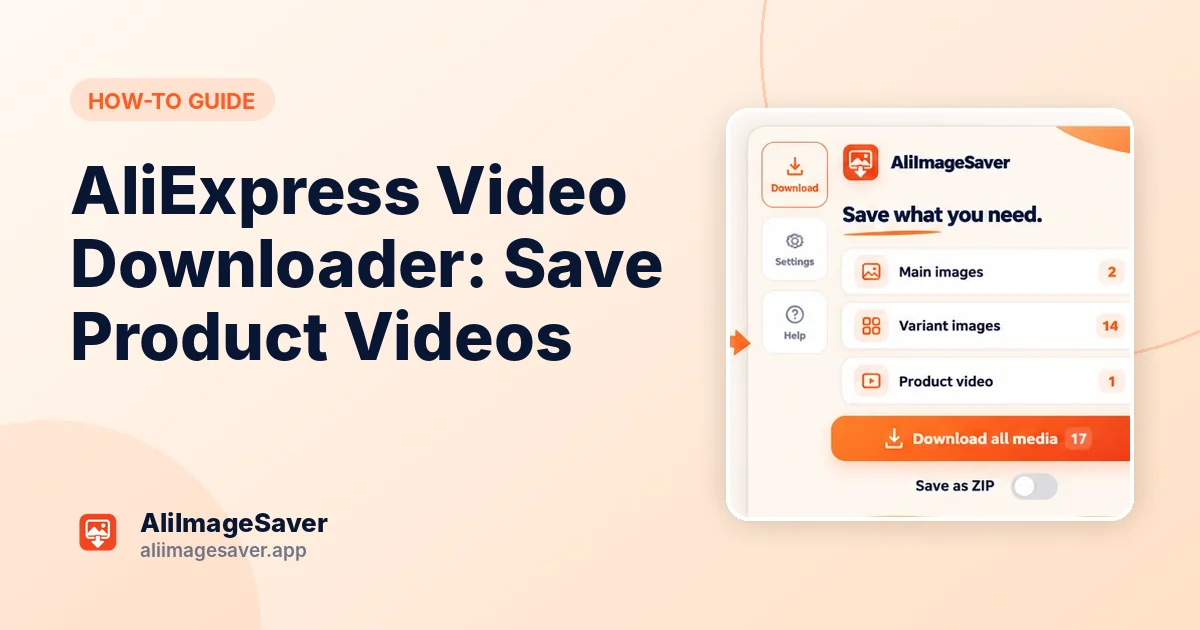
AliExpress has no download button for its videos. With AliImageSaver, open the product page, click the extension icon and choose Product video. The clip is saved as an MP4 file named main-video-1.mp4, ready for any video editor. Not every listing has a video; if the group shows 0, the seller hasn't added one.
Our AliExpress video downloader guide also shows a manual way with Chrome DevTools.
Check the clip before you edit
- Shape. Supplier videos are often square or horizontal. Ads on TikTok and in Reels work best in vertical 9:16, so plan to reframe.
- Sharpness. A low-resolution clip looks soft when it fills a phone screen. If it does, ask the supplier for the original file.
- Burned-in text, logos and watermarks. Don't remove logos or watermarks from footage you don't own. Ask for a clean version, or use the parts of the clip without them.
- Music. The soundtrack on a supplier video is almost never licensed for your ads. Meta's policies say you need the licenses for any music in an ad, so mute it and add music you're allowed to use.
Turn AliExpress product videos into 9:16 ads
You have three options, and most video editors, including free mobile apps, can do all of them:
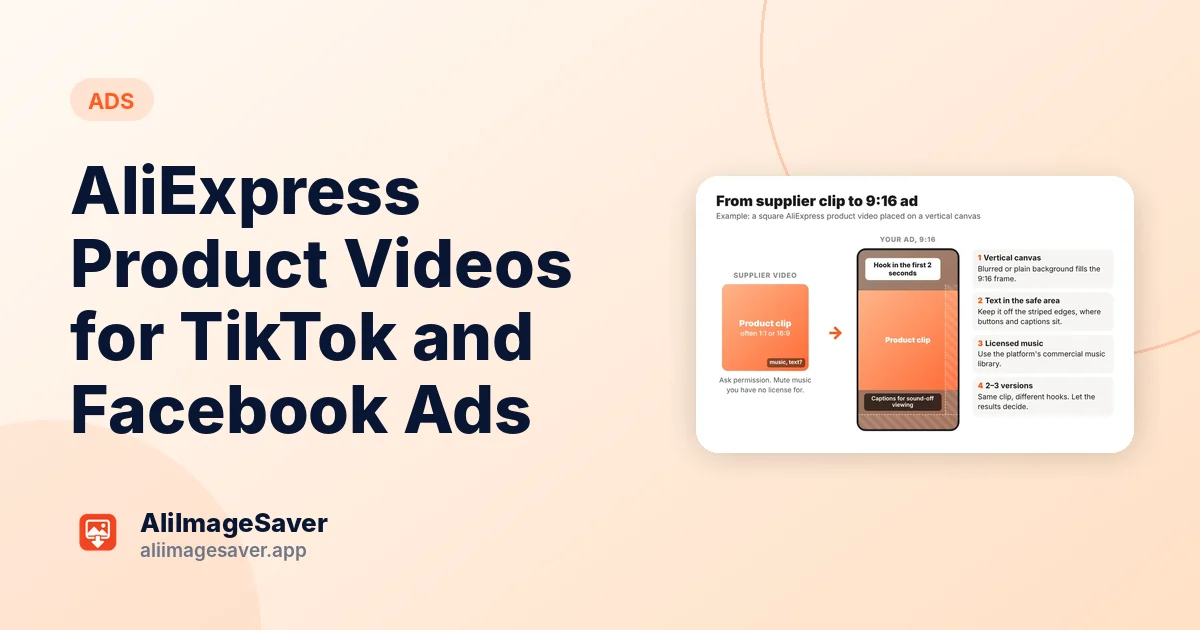
- Crop to 9:16 if the product stays in the frame. This works for close-ups, but cuts too much from wide shots.
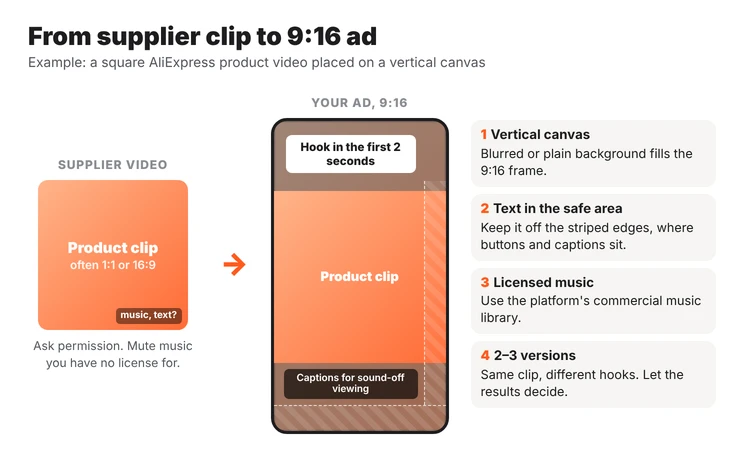
- Place the clip on a 9:16 canvas with a blurred copy of the video or a plain color behind it. Use the space above and below for your hook and captions.
- Combine clips. Mix the supplier's footage with short clips you film yourself, such as unboxing or the product in your hand.
Edit it into an ad people actually watch
- Start with the hook. Show the result or the problem in the first two seconds. A slow product spin at the start is easy to scroll past.
- Add captions. Plenty of people watch with the sound off, so say the main benefit in text as well.
- Keep text in the safe area. On TikTok and in Reels, buttons, the account name and the ad text cover the bottom and the right side of the screen. Keep important text and the product away from those edges.
- Use licensed music. TikTok's Commercial Music Library and Meta's Sound Collection have tracks you can use in ads.
- End with the offer. Price, free shipping or a discount, in a few words.
- Make two or three versions. Use the same clip with different hooks and let the results decide which one to keep.
TikTok and Meta video specs at a glance
| TikTok in-feed ads | Facebook and Instagram Reels ads | |
|---|---|---|
| Shape | 9:16 recommended (1:1 and 16:9 also accepted) | 9:16 |
| Size | At least 540 × 960 px, 720 × 1280 px or more recommended | 1440 × 2560 px recommended |
| Length | 5 to 60 seconds | Keep it short |
| File size | Up to 500 MB | Up to 4 GB |
| File type | MP4, MOV, MPEG, 3GP | MP4, MOV |
For Facebook Feed, Meta recommends a 4:5 video. Specs change from time to time, so check TikTok Ads Manager and Meta's Ads Guide before you upload.
When to film your own video instead
If the same supplier clip is already running in a dozen other stores' ads, yours will look like one more copy. Order a sample and film a few short clips on your phone: unboxing, the product in use, a close-up of the details. Real footage builds trust, and nobody can report it as theirs. Supplier clips are still useful for the shots you can't film yourself.
Ready to save your first clip? Add AliImageSaver to Chrome and download AliExpress product videos and images in one click. It's free.
Frequently asked questions
Can I use AliExpress product videos in Facebook ads?
Only with permission from whoever owns the video, usually the seller or the manufacturer. Meta can reject or remove ads that infringe someone's rights, so ask your supplier and keep their answer.
What video size is best for TikTok ads?
Vertical 9:16. TikTok asks for at least 540 × 960 px and recommends 720 × 1280 px or more, with a file size up to 500 MB.
Can I keep the music from the AliExpress video?
Usually not. You need a license for any music in an ad. Mute the original track and use music from TikTok's Commercial Music Library or Meta's Sound Collection.
How do I turn a square AliExpress video into a 9:16 ad?
Place it on a 9:16 canvas with a blurred or plain background, or crop it if the product stays in the frame. Use the space above and below the clip for your hook and captions.
How do I download AliExpress product videos?
Open the product page, click AliImageSaver and choose Product video. The video is saved as an MP4 file you can open in any video editor.