How to Add AliExpress Product Images to Shopify
You've found a product, the supplier said yes, and the photos are on your computer. Now they need to look good in your store. This guide shows how to add AliExpress product images to Shopify, from the downloaded files to a finished product page with a clean gallery, a photo for every color and the product video.
Before you add AliExpress images to Shopify
Two things save you trouble later:
- Permission. Product photos belong to the seller or whoever took them. Ask the supplier if you can use their photos and video in your store, and keep the answer. Our guide to using AliExpress images for dropshipping explains how.
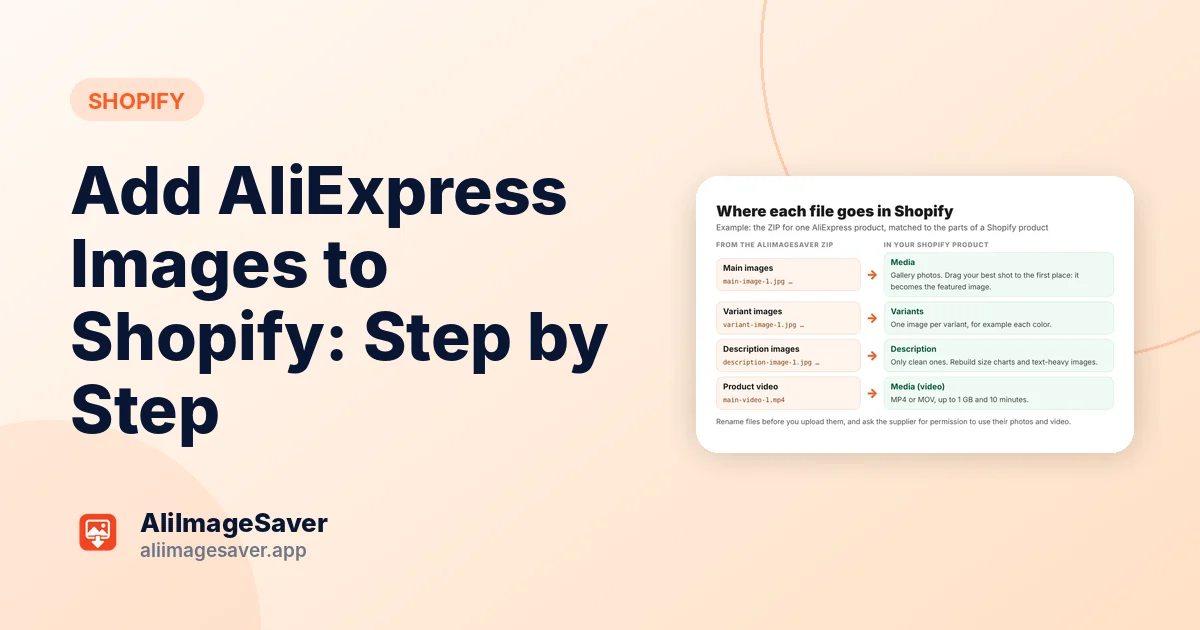
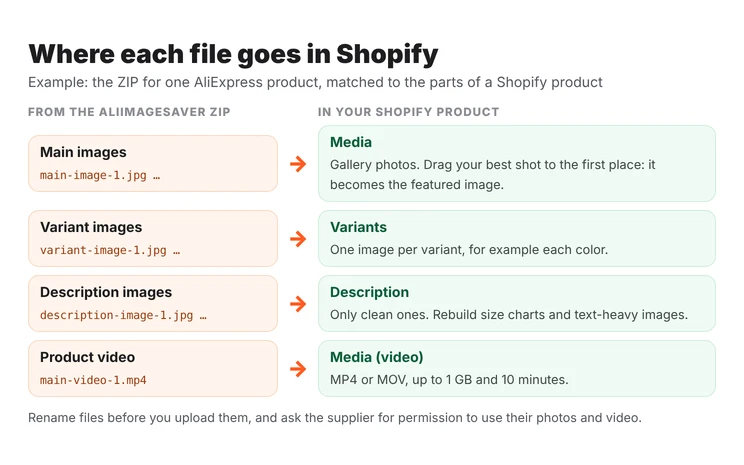
- The full set of files. AliImageSaver saves the main images, variant images, description images and video of a product in one click, as a ZIP if you like. If you're adding many products, follow our bulk download workflow so each product has its own ZIP.
Prepare the AliExpress images for Shopify
- Unzip the archive. Shopify takes images, not ZIP files. On Windows, right-click the ZIP and choose Extract All; on a Mac, double-click it.
- Pick the best photos. Four to six gallery images, one photo per color or variant and a few close-ups are usually enough. Skip near-duplicates and images covered in text.
- Rename the files. The file name becomes part of the image address in your store, so
black-rain-jacket-front.jpgis better thanmain-image-1.jpgfor image search. - Crop to the same shape. Product grids look tidy when all images share one aspect ratio. Shopify says a size of 2048 × 2048 px usually looks best for square product images.
- Check size and sharpness. Many AliExpress photos are smaller than 2048 px, which is fine, but zoom will look soft. If an image is clearly blurry, get the full-size AliExpress image or ask the supplier for the original.
Shopify accepts JPEG, PNG, WEBP, HEIC and GIF images up to 20 MB and 20 megapixels each, so AliExpress WebP files can go in as they are. You only need to convert WebP to JPG if another tool, such as a photo editor, can't open them.
Upload the images to a Shopify product
- In your Shopify admin, go to Products and open the product, or create a new one.
- In the Media section, drag your image files in, or click Upload new and select them.
- Drag the images into the order you want. The first one is the main image that appears in collections and search results.
- Click Save.
If your images have different shapes, Shopify's built-in media editor can crop them to the same aspect ratio. Click an image in the product's media to open it.
Link AliExpress variant images to Shopify variants
When a shopper picks a color, the product page should show that color. The variant images from AliExpress are made for this:
- Open the product and scroll to the Variants section.
- Click the image icon next to a variant.
- Choose one of the product images you already uploaded, or click Add image to upload a new one.
- Click Done, then Save.
Shopify lets you add one image to each variant, and variants can't have videos or 3D models. Check that each photo really matches its variant: on AliExpress the order of the color thumbnails doesn't always match the order of the options in your store.
Add alt text to every image
Alt text describes an image for shoppers who use screen readers, and it helps search engines understand your photos. In Shopify, open the product, click an image, choose Add alt text, type a short description and save it. Shopify recommends keeping alt text to about 125 characters or less.
Describe what the photo shows, in plain words: "black waterproof hooded rain jacket, front view" works better than a list of keywords.
Add the AliExpress product video
A short product video can answer questions that photos can't. AliImageSaver saves the AliExpress video as an MP4 file, which you can upload to the same Media section as your images. Shopify accepts MP4 and MOV videos up to 1 GB and 10 minutes long, and your theme needs to support video on product pages. Shopify also lets you add a YouTube or Vimeo link instead of a file.
The same rule applies as for photos: ask the supplier before you use their video. Our AliExpress video downloader guide covers saving videos in more detail.
What to do with description images
Description images often contain size charts, Chinese text or long collages that don't fit a store's design. Use them as a source, not as they are:
- Size charts: rebuild them as a table in your own units. Our guide to the AliExpress size chart shows how to read them.
- Clean photos: close-ups and in-use shots can go into the gallery or into the description with the editor's image button.
- Text-heavy images: write the information as text instead. Shoppers can read it on any screen, and search engines can read it too.
Haven't saved the photos yet? Add AliImageSaver to Chrome and get every image and video from a product page in one click. It's free.
Frequently asked questions
Can I upload AliExpress WebP images to Shopify?
Yes. Shopify accepts JPEG, PNG, WEBP, HEIC and GIF images, so you can upload WebP files without converting them.
What size should product images be for Shopify?
Shopify says 2048 × 2048 px usually looks best for square product images. Each image can be up to 20 MB and 20 megapixels. Smaller AliExpress photos still work, but zoom will look softer.
Can I add more than one image to a Shopify variant?
Shopify lets you add one image to each variant. Some themes and apps can show more photos per variant, but by default it's one.
Can I put the AliExpress product video on my Shopify product page?
Yes, if the supplier allows it and your theme supports video. Upload the MP4 to the product's Media section. Shopify accepts videos up to 1 GB and 10 minutes long.
Is there a faster way to import AliExpress products to Shopify?
Dropshipping apps can import whole listings, images included. Saving the files yourself with AliImageSaver gives you more control: you choose the photos, rename and edit them, and upload only what you need.