Blurry AliExpress Images? How to Get the Full-Size, High-Resolution Photos
You save a product photo from AliExpress, put it in your store, and it looks soft or pixelated. In almost every case you saved a resized copy, not the original file the seller uploaded.
This guide explains why AliExpress images are blurry when you save them, how to check an image's real size, and how to get full-size AliExpress images, one at a time or for a whole product at once.
Why AliExpress images are blurry when you save them
To keep pages fast, AliExpress almost never shows you the original photo. It shows resized copies:
- Thumbnails in the gallery strip and next to the color options are tiny, often around 220 pixels wide.
- Gallery previews are bigger, but still resized and compressed, and usually delivered as WebP or AVIF.
- Zoom views load larger copies only when you hover, and right-clicking often grabs the smaller one underneath.
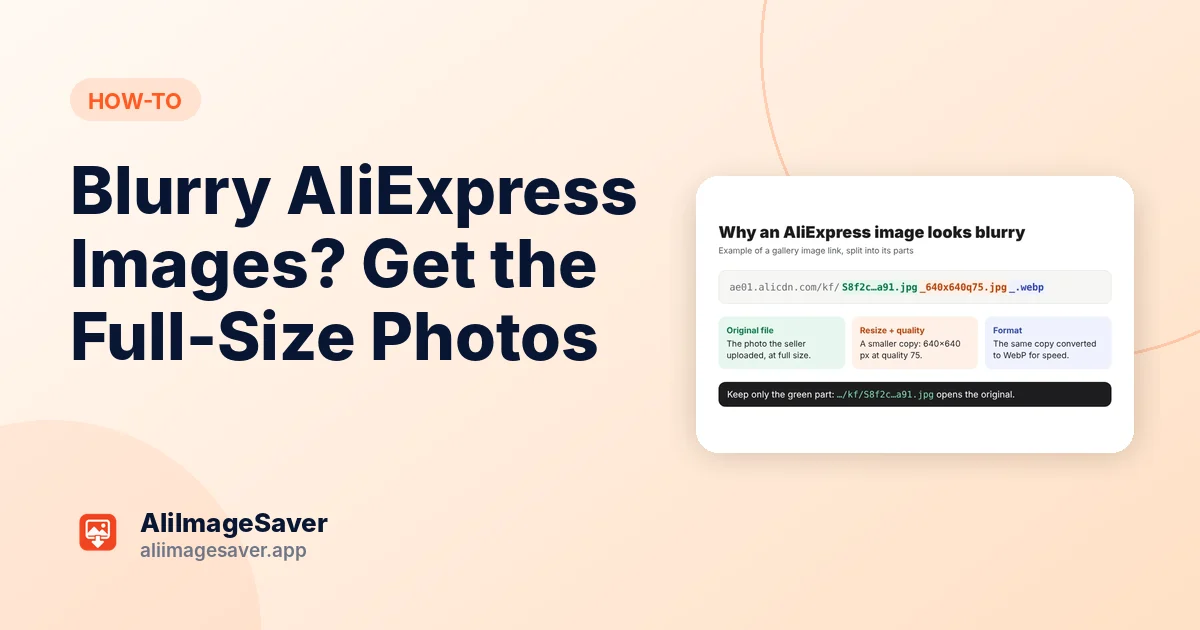
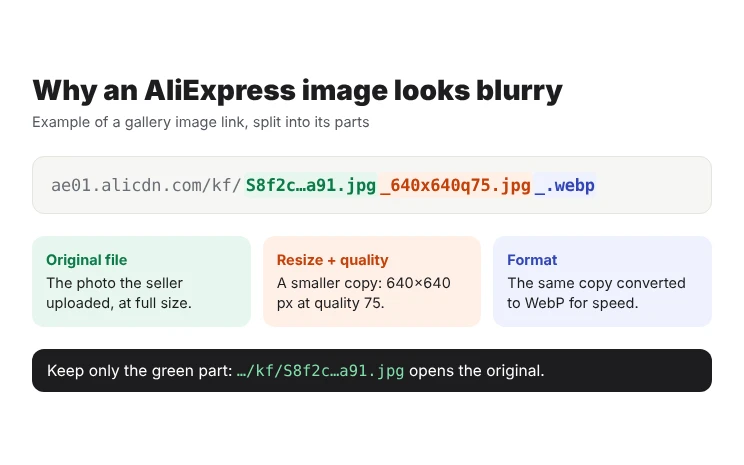
The image link tells you which copy you have. Everything after the original file name is an instruction to make it smaller:
How to check an image's real size
- In Chrome: right-click the image, choose Open image in new tab, and look at the tab title. Chrome shows the size in pixels, for example
(640×640). - On Windows: right-click the saved file, choose Properties → Details and look at Dimensions.
- On a Mac: select the file in Finder, press Cmd+I and look under More Info.
For a store product photo you want at least 800 pixels on the shorter side, and more is better if the supplier has it.
How to get full-size AliExpress images from the link
- On the product page, click the gallery photo you want so it shows large.
- Right-click it and choose Open image in new tab.
- In the address bar, delete everything after the first
.jpg(or.png). For example,…/kf/S8f2c….jpg_640x640q75.jpg_.webpbecomes…/kf/S8f2c….jpg. - Press Enter. The tab title now shows a larger size. Right-click and choose Save image as….
The file you save may still be WebP inside, because AliExpress can send WebP even for a clean .jpg address. If your editor or store needs a real JPG, see how to convert AliExpress WebP to JPG.
Save full-size AliExpress images in bulk
Editing links works for one or two photos. For a whole product, with gallery photos, color variants and description images, use AliImageSaver. It takes the image links from the product's own data instead of the small thumbnails on the page, so you don't have to fix each link by hand.
- Open the product page and scroll through the description once.
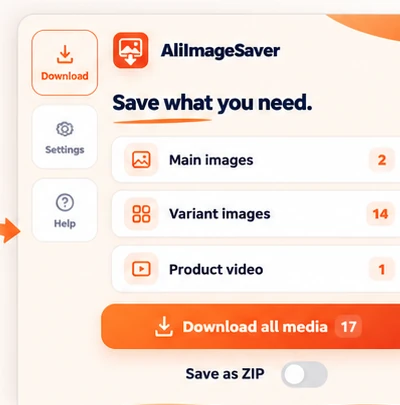
- Click the AliImageSaver icon and choose a group, or Download all media.
- Open two or three of the saved files and check their size, as shown above.
For the full walkthrough, see how to download AliExpress images.
What if the original is small too?
No tool can download more detail than the seller uploaded. If the original file is small or heavily compressed, try this:
- Look for another listing. The same product is often sold by several sellers, and one of them may have better photos. AliExpress's search by image (the camera icon in the search bar) helps you find them.
- Ask the supplier. Many suppliers have the original photo files and will send them if you're a reseller.
- Upscale with care. AI upscalers can make a small photo look sharper, but they can also invent details. Never let an upscaled image show something the product doesn't have.
- Use the photos you have well. Show small images at their real size instead of stretching them, and lead with your sharpest photo.
Before you publish supplier photos, read using AliExpress images for dropshipping.
Frequently asked questions
Why are AliExpress images so small when I save them?
Because the page shows resized copies to load faster. Right-clicking a thumbnail or a gallery preview saves that smaller copy instead of the original file.
How do I get the original AliExpress image?
Open the image in a new tab, delete everything after the first .jpg or .png in the address, press Enter and save the image. That opens the file the seller uploaded.
What is the maximum size of AliExpress images?
It depends on what the seller uploaded. Many product photos are around 800 to 1,000 pixels square, some are bigger, and some are smaller.
Does AliImageSaver download full-size images?
It takes the image links from the product's data instead of the page thumbnails. If the seller uploaded a small photo, the saved file will be small too.